More than 67 million Americans rely on Medicare for their healthcare coverage, making Medicare one of the largest payer programs in the United States. For healthcare providers, participating in Medicare means access to a large and growing patient population, but only if you’re properly credentialed with the Centers for Medicare & Medicaid Services (CMS).
Unfortunately, Medicare enrollment isn’t as simple as completing a single application. Incorrect CMS forms, missing documentation, inconsistent provider information, or enrollment errors can delay approval for weeks or even months, leading to claim denials, delayed reimbursements, and lost revenue.
This guide explains everything you need to know about Medicare credentialing, including eligibility requirements, CMS enrollment forms, timelines, common mistakes, and best practices to help you complete the process accurately and start billing Medicare with confidence.
Medicare Credentialing Overview
| Category | Details |
|---|---|
| What is Medicare Credentialing? | The CMS verification and enrollment process that authorizes healthcare providers to participate in Medicare and bill for covered services. |
| Managed By | Centers for Medicare & Medicaid Services (CMS) |
| Enrollment System | Provider Enrollment, Chain, and Ownership System (PECOS) |
| Primary Identifier | National Provider Identifier (NPI) |
| Approval Result | Provider Transaction Access Number (PTAN) and Medicare billing privileges |
| Average Processing Time | Typically 45–90 days, although complex applications or requests for additional information may extend the timeline. |
| Who Needs It? | Physicians, nurse practitioners, physician assistants, therapists, behavioral health providers, clinics, hospitals, laboratories, DME suppliers, home health agencies, and other eligible healthcare organizations. |
| Key CMS Forms | CMS-855I, CMS-855B, CMS-855R, CMS-855O, CMS-460, CMS-588 |
| Revalidation | Required periodically to maintain Medicare billing privileges and compliance with CMS regulations. |
What is Medicare Credentialing?
Medicare credentialing is the process of verifying a healthcare provider’s qualifications and enrolling them with the Centers for Medicare & Medicaid Services (CMS) so they can participate in the Medicare program and bill for covered services.
During this process, CMS verifies that a provider meets federal enrollment requirements, including professional licensure, education, certifications, practice information, ownership details, and other regulatory standards. Once approved, providers receive a Provider Transaction Access Number (PTAN), which activates their Medicare billing privileges.
Most providers complete Medicare enrollment electronically through PECOS (Provider Enrollment, Chain, and Ownership System) by submitting the appropriate CMS enrollment forms and supporting documentation.
The exact requirements vary depending on your provider type. For example:
- Individual physicians enroll using CMS-855I.
- Group practices enroll using CMS-855B.
- Providers joining an existing group submit CMS-855R to reassign Medicare benefits.
- Providers who only order or refer services use CMS-855O.
Understanding which form applies to your practice is one of the most important steps in preventing enrollment delays.
Who Needs Medicare Credentialing?
Any healthcare provider or organization that wants to treat Medicare beneficiaries and receive reimbursement from Medicare must complete the Medicare enrollment process before submitting claims. While the requirements vary by provider type, Medicare credentialing is mandatory for most professionals and facilities participating in the Medicare program.
Common providers that require Medicare credentialing include:
- Physicians (MD & DO)
- Nurse Practitioners (NPs)
- Physician Assistants (PAs)
- Clinical Nurse Specialists (CNSs)
- Physical, Occupational, and Speech Therapists
- Clinical Psychologists
- Clinical Social Workers
- Mental Health Counselors (where eligible)
- Dentists (for covered Medicare services)
- Group Practices
- Hospitals and Health Systems
- Rural Health Clinics (RHCs)
- Federally Qualified Health Centers (FQHCs)
- Home Health Agencies (HHAs)
- Hospices
- Clinical Laboratories
- Durable Medical Equipment, Prosthetics, Orthotics, and Supplies (DMEPOS) Suppliers
Tip: Even if you’re joining an existing medical group, you’ll still need individual Medicare enrollment before your billing privileges can be reassigned to the organization.
Medicare vs Medicaid Credentialing
|
Medicare |
Medicaid |
|---|---|
|
Federal program |
State-administered program |
|
Managed by CMS |
Managed by state Medicaid agencies |
|
Enrollment through PECOS |
State-specific enrollment systems |
|
National standards |
Requirements vary by state |
|
Primarily serves adults 65+ and certain disabled individuals |
Primarily serves eligible low-income individuals and families |
Planning to participate in Medicaid? Read our Medicaid Credentialing Guide to understand eligibility, enrollment requirements, and state-specific credentialing processes.
Medicare Credentialing Eligibility Requirements
Before submitting a Medicare enrollment application, providers must meet CMS eligibility requirements. Although specific requirements differ by provider type, most applicants must have:
- An active, unrestricted professional license in the state where they practice
- A valid National Provider Identifier (NPI)
- A Tax Identification Number (TIN/EIN) or Social Security Number (SSN)
- Required education, training, and professional certifications
- No exclusions from federally funded healthcare programs
- A verified practice location and business information
- Compliance with all applicable CMS enrollment requirements
Certain specialties may also require DEA registration, board certification, or additional documentation depending on the services provided. Meeting these requirements before starting your application significantly reduces the risk of enrollment delays or requests for additional information.
Documents Required for Medicare Credentialing
Having complete and accurate documentation is one of the most important factors in a successful Medicare enrollment. Before starting your application, gather the following documents:
| Required Document | Purpose |
|---|---|
| State Professional License | Verifies authorization to practice |
| National Provider Identifier (NPI) | Identifies the provider in Medicare |
| Tax ID (TIN/EIN) or SSN | Required for enrollment and billing |
| Curriculum Vitae (CV) | Confirms education and work history |
| Malpractice Insurance | Demonstrates professional liability coverage |
| DEA Registration (if applicable) | Required for providers prescribing controlled substances |
| Board Certifications (if applicable) | Confirms specialty qualifications |
| W-9 Form | Tax reporting information |
| Electronic Funds Transfer (EFT) Information | Enables Medicare reimbursement via direct deposit |
| Ownership & Practice Information | Required for group practices and organizations |
Best Practice: Before submitting your application, verify that your information matches your NPI Registry (NPPES), state licensing records, IRS information, and supporting documents. Even minor inconsistencies can delay Medicare approval.
CMS Medicare Enrollment Forms Explained
Selecting the correct CMS enrollment form is one of the most important parts of the Medicare credentialing process. Each form serves a different purpose based on the provider’s role and billing structure.
| CMS Form | Who Uses It? | Purpose |
|---|---|---|
| CMS-855I | Individual physicians & non-physician practitioners | Initial Medicare enrollment |
| CMS-855B | Group practices & healthcare organizations | Organizational enrollment |
| CMS-855R | Individual providers joining a group | Reassign Medicare billing privileges |
| CMS-855O | Ordering or referring providers only | Register without billing Medicare directly |
| CMS-460 | Participating physicians & suppliers | Medicare Participation Agreement |
| CMS-588 | All enrolling providers | Electronic Funds Transfer (EFT) authorization |
Pro Tip: Submitting the wrong CMS form is one of the most common reasons Medicare applications are delayed. Always confirm which form applies to your provider type before beginning the enrollment process.
Step-by-Step Medicare Credentialing Process

Successfully enrolling in Medicare requires more than submitting an application. Providers must verify their qualifications, complete the correct CMS enrollment forms, provide supporting documentation, and undergo a review by the Centers for Medicare & Medicaid Services (CMS) and their regional Medicare Administrative Contractor (MAC).
While the process varies slightly based on provider type, specialty, and practice structure, the overall workflow remains the same for most healthcare professionals and organizations.
Step 1: Verify Your Eligibility
Before applying, confirm that you meet CMS enrollment requirements. You should have an active professional license, a valid National Provider Identifier (NPI), the appropriate Tax Identification Number (TIN/EIN or SSN), and all required certifications for your specialty.
Step 2: Prepare Your Documentation
Gather all required enrollment documents before starting your application. Ensuring your information is accurate and consistent across your NPI, state licensing board, IRS records, and supporting documents helps prevent processing delays.
Step 3: Complete the Appropriate CMS Forms
Select the correct CMS enrollment form based on your provider type and billing structure. Using the wrong form or submitting incomplete information is one of the most common reasons Medicare applications require additional review.
Step 4: Submit Your Application Through PECOS
CMS recommends submitting applications electronically through PECOS (Provider Enrollment, Chain, and Ownership System). Electronic submissions are generally processed faster than paper applications and include built-in validation checks that help reduce common enrollment errors.
Step 5: Medicare Administrative Contractor (MAC) Review
After submission, your regional Medicare Administrative Contractor (MAC) reviews the application, verifies provider credentials, and may request additional documentation. Responding promptly to these requests helps keep the enrollment process moving.
Step 6: Receive Your PTAN and Begin Billing
Once your application is approved, CMS issues your Provider Transaction Access Number (PTAN). After your enrollment becomes effective, you can begin submitting Medicare claims for covered services.
Step 7: Maintain Your Medicare Enrollment
Enrollment doesn’t end after approval. Providers must keep their information current by reporting ownership or practice changes, updating licenses, and completing Medicare revalidation when required to maintain active billing privileges.
How Long Does Medicare Credentialing Take?
Processing times vary depending on your provider type, application accuracy, and the workload of your regional Medicare Administrative Contractor (MAC). While electronic applications submitted through PECOS are generally processed faster than paper applications, providers should still plan ahead.
| Enrollment Stage | Estimated Timeline |
|---|---|
| Gather required documents | 1–2 weeks |
| Complete CMS application | 1–5 days |
| Submit through PECOS | Same day |
| MAC review & verification | 2–6 weeks |
| CMS approval | 2–8 weeks |
| Typical Total Timeline | 45–90 days |
Planning Tip: If you’re opening a new practice, hiring a provider, or expanding to a new location, begin Medicare enrollment at least 3–4 months in advance to avoid reimbursement delays.
Medicare Credentialing by Provider Type
Although the overall enrollment process is similar, the required forms and documentation vary by provider type.
| Provider Type | Primary CMS Forms | Key Requirements |
|---|---|---|
| Individual Physicians & NPPs | CMS-855I, CMS-588 | NPI, state license, malpractice insurance, PTAN |
| Group Practices | CMS-855B, CMS-855R | EIN/TIN, ownership information, provider reassignment |
| Behavioral Health Providers | CMS-855I | Professional license, specialty credentials, PECOS enrollment |
| Telehealth Providers | CMS-855I or CMS-855B | Active enrollment, state licensure, telehealth compliance |
| Therapy Practices (PT, OT, SLP) | CMS-855I / CMS-855B | Professional licensing and Medicare participation requirements |
| Hospitals & Healthcare Facilities | CMS-855A | Facility licensing, ownership disclosures, participation agreement |
| DMEPOS Suppliers | CMS-855S | Supplier accreditation, compliance, site verification |
Quick Notes
- Individual providers must obtain an NPI, enroll through PECOS, and receive a PTAN before billing Medicare.
- Group practices require organizational enrollment, while each provider must also maintain individual Medicare enrollment.
- Behavioral health and telehealth providers should stay updated on changing CMS coverage and participation policies.
- Hospitals and DMEPOS suppliers have additional CMS compliance and verification requirements compared to individual practitioners.
Tip: Always use the correct CMS enrollment form for your provider type. Submitting the wrong application is one of the most common causes of Medicare enrollment delays.
Medicare Revalidation Requirements
Medicare enrollment is not a one-time process. CMS periodically requires enrolled providers and suppliers to revalidate their enrollment information to confirm that licenses, ownership details, practice locations, and other records remain accurate.
Failure to complete revalidation by the CMS deadline may result in deactivation of Medicare billing privileges, delaying reimbursements until enrollment is restored.
To stay compliant:
- Monitor revalidation notices from CMS and your MAC.
- Keep PECOS information up to date.
- Report changes to ownership, practice location, or legal business information promptly.
- Renew licenses, certifications, and other credentials before they expire.
Pro Tip: Maintaining accurate provider information year-round makes Medicare revalidation much faster and helps prevent unnecessary interruptions in billing.
Common Reasons Medicare Credentialing Is Delayed or Rejected
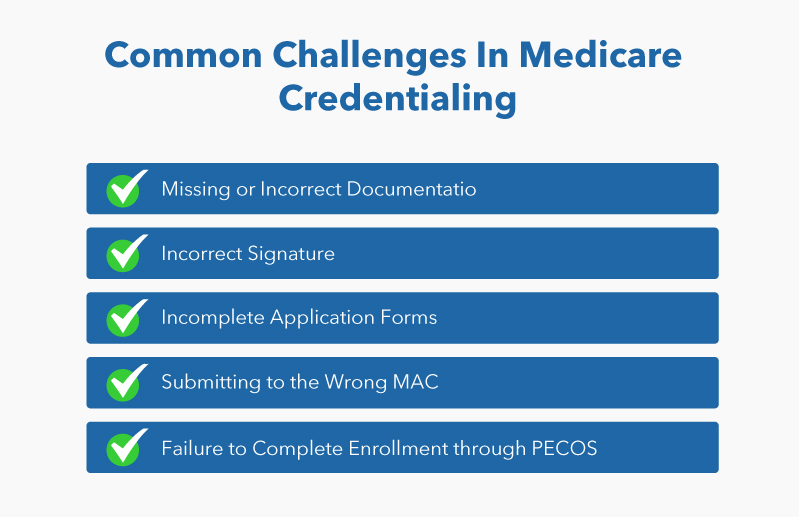
Even experienced healthcare providers can encounter Medicare enrollment delays. In most cases, the issue isn’t eligibility—it’s incomplete documentation, inconsistent information, or missing CMS requirements. Identifying these common mistakes before submitting your application can help you avoid weeks of unnecessary delays.
| Common Issue | How to Avoid It |
|---|---|
| Incomplete CMS application | Review every section before submitting. Missing fields often trigger additional documentation requests. |
| Incorrect or outdated provider information | Ensure your NPI, state license, IRS records, and PECOS information are consistent. |
| Missing supporting documents | Include all required licenses, malpractice insurance, EFT details, ownership information, and certifications. |
| Submitting the wrong CMS form | Use the enrollment form that matches your provider type and billing structure. |
| Delayed response to MAC requests | Respond promptly to requests for additional documentation to prevent processing delays. |
| Ownership or practice information doesn’t match | Verify legal business name, TIN/EIN, ownership disclosures, and practice addresses before submission. |
| Failure to update provider records | Keep PECOS and NPPES records current whenever your practice information changes. |
Expert Tip: Most Medicare enrollment delays are preventable. A thorough application review before submission is often the fastest way to avoid costly corrections later.
Can You Bill Medicare Before Credentialing Approval?
No. In most cases, providers should wait until Medicare enrollment is approved and an effective enrollment date has been established before submitting claims.
Submitting claims before approval may result in:
- Claim denials or rejections
- Delayed reimbursement
- Additional administrative work
- Lost revenue if timely filing deadlines are exceeded
While CMS allows limited retrospective billing in certain situations after enrollment approval, these rules vary based on provider type and enrollment circumstances. Providers should confirm their effective billing date before submitting Medicare claims.
The safest approach is to begin credentialing 90–120 days before your anticipated start date so you’re approved before seeing Medicare patients.
Quick Medicare Credentialing Checklist
Before submitting your Medicare enrollment application, use this checklist to ensure everything is complete and accurate. Spending a few extra minutes reviewing your application can help reduce delays, avoid additional documentation requests, and speed up approval.
| ✓ | Checklist |
|---|---|
| ☐ | Obtain a National Provider Identifier (NPI) through NPPES. |
| ☐ | Verify your state license is active and unrestricted. |
| ☐ | Gather all required documents (malpractice insurance, CV, W-9, DEA registration if applicable, EFT information, ownership details). |
| ☐ | Select the correct CMS enrollment form (CMS-855I, 855B, 855R, 855O, 855A, or 855S). |
| ☐ | Ensure your NPI, IRS records, state license, and practice information match exactly. |
| ☐ | Complete your enrollment through PECOS whenever possible. |
| ☐ | Review every section before submission to avoid incomplete information. |
| ☐ | Keep copies of all submitted documents and confirmation receipts. |
| ☐ | Respond promptly to any requests from your Medicare Administrative Contractor (MAC). |
| ☐ | Confirm your PTAN and Medicare effective date before billing Medicare patients. |
| ☐ | Schedule reminders for future Medicare revalidation and provider information updates. |
Pro Tip: Most enrollment delays occur because of incomplete documentation, inconsistent provider information, or selecting the wrong CMS enrollment form—not because providers fail to meet CMS eligibility requirements.
Medicare Credentialing Statistics & Industry Insights
Understanding the scale of Medicare and the credentialing process highlights why accurate enrollment is essential for every healthcare practice.
| Metric | Insight |
|---|---|
| Medicare beneficiaries | More than 67 million Americans are enrolled in Medicare. |
| Medicare enrollment processing | Most applications are processed within 45–90 days, though complex cases may take up to 120 days. |
| Medicare Administrative Contractors | 7 MAC jurisdictions process Medicare Part A and Part B claims across the United States. |
| Enrollment method | PECOS is the CMS-recommended online enrollment system and generally processes applications faster than paper submissions. |
| Medicare revalidation | Most enrolled providers must revalidate approximately every 5 years or whenever requested by CMS. |
| Common causes of delays | Missing documents, inconsistent provider information, incorrect CMS forms, and delayed responses to MAC requests. |
Practice Tip: Starting the credentialing process 90–120 days before your planned start date provides enough time to resolve documentation requests and avoid interruptions in Medicare billing.
Benefits of Professional Medicare Credentialing Services
While providers can complete Medicare enrollment independently through CMS and PECOS, many practices choose professional credentialing services to reduce administrative workload and minimize costly enrollment errors.
A credentialing specialist can help:
- Verify provider documents before submission.
- Complete CMS enrollment forms accurately.
- Manage PECOS registration and application submission.
- Track application status with your Medicare Administrative Contractor (MAC).
- Respond to CMS development requests promptly.
- Assist with provider additions, group enrollments, reassignment applications, and Medicare revalidation.
- Reduce claim delays caused by enrollment errors.
- Allow physicians and administrative staff to focus on patient care instead of paperwork.
For growing practices, multi-provider clinics, behavioral health organizations, telehealth providers, and DME suppliers, outsourcing credentialing often results in faster approvals and fewer administrative challenges.
Need Help With Medicare Credentialing?
Whether you’re enrolling for the first time, adding a new provider, joining a group practice, or preparing for Medicare revalidation, our credentialing specialists manage the entire process—from document collection and PECOS enrollment to CMS follow-up and final approval. We help healthcare providers reduce administrative burden, minimize enrollment delays, and become billing-ready with confidence.
Schedule a free consultation today to discuss your Medicare enrollment needs and receive a personalized credentialing roadmap. Feel free to reach out to us at (415) 508-653