

Switching an EHR system is more than a technology upgrade; it can directly impact billing, claims, accounts receivable, and revenue cycle performance. A poorly planned migration can lead to missing data, claim delays, increased denials, payment errors, and cash flow disruption.
This guide explains how healthcare providers can switch EHR systems without disrupting billing, protecting revenue, improving workflows, and maintaining compliance throughout the transition.
Quick Answer: Can You Switch EHR Systems Without Disrupting Billing?
Yes. Healthcare practices can switch EHR systems without billing disruption by treating migration as a revenue protection process.
| Key Requirement | Purpose |
|---|---|
| Revenue Assessment | Identify billing risks before migration |
| Data Validation | Prevent missing or inaccurate records |
| Workflow Mapping | Align old and new billing processes |
| System Testing | Ensure claims and payments work correctly |
| Staff Training | Reduce workflow errors after launch |
| Monitoring | Track revenue performance after go-live |
Why EHR Migration Is a Revenue Cycle Risk, Not Just an IT Project
EHR migration is not only about moving data from one system to another. It directly affects revenue cycle workflows that impact reimbursement.
Key areas at risk include:
- Patient registration and insurance verification
- Documentation and coding workflows
- Charge capture and claim submission
- Payment posting and AR reporting
Errors during migration can lead to eligibility issues, claim denials, delayed payments, and inaccurate financial reporting.
A successful EHR transition protects both clinical data and revenue performance.
Common EHR Systems Practices Migrate Between
Healthcare organizations switch EHR systems due to workflow limitations, billing challenges, scalability needs, and integration requirements.
| Current EHR System | Common Migration Reasons |
|---|---|
| Epic Systems | Complex workflows, enterprise scalability, integration needs |
| Oracle Health (formerly Cerner) | Platform modernization, interoperability, system consolidation |
| athenahealth | Workflow optimization, practice growth, billing efficiency |
| eClinicalWorks | Usability improvements, reporting, workflow changes |
| NextGen Healthcare | Specialty workflow needs and practice management improvements |
| Tebra | Cloud-based practice management and patient engagement needs |
| Practice Fusion | Advanced integrations and system improvements |
Regardless of the platform, migration risks usually involve:
- Patient data accuracy
- Billing workflow alignment
- Claim submission testing
- Insurance information transfer
- Revenue cycle continuity
A successful migration focuses less on the software name and more on protecting workflows and reimbursement performance.
The Hidden Financial Impact of Poor EHR Migration Planning
EHR migration success is not only about data transfer and system launch. Revenue cycle leaders must also monitor financial performance after implementation.
| Revenue Area | Migration Risk |
|---|---|
| Claims Processing | Delayed or rejected claims |
| Payment Collection | Posting and reconciliation errors |
| Accounts Receivable | Increased aging balances |
A poorly planned migration can disrupt collections, increase administrative workload, and affect cash flow.
EHR Migration Cost, Timeline, and Planning Considerations
EHR migration timelines and costs depend on practice size, data volume, specialty workflows, integrations, and training needs.
| Factor | Impact on Migration |
|---|---|
| Number of Providers | More users require additional setup and training |
| Data Volume | Larger records need more validation and planning |
| Specialty Workflows | Complex billing requires extra testing |
| Integrations | Labs, payers, and clearinghouses add complexity |
| Staff Training | Improves adoption and reduces errors |
A rushed migration without proper testing can create bigger financial problems through claim delays, denials, and revenue disruption.
Step-by-Step EHR Migration Process Without Disrupting Billing
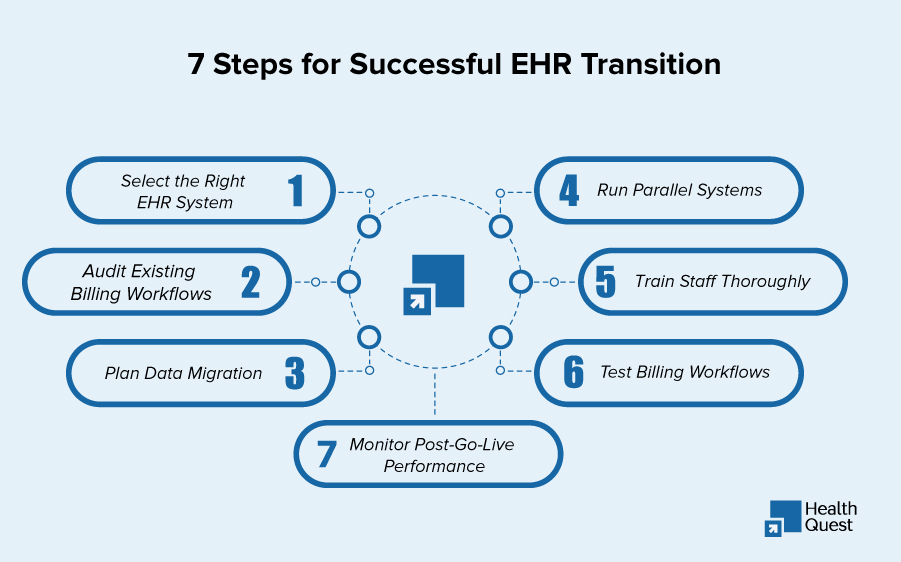
A structured migration process helps maintain revenue continuity while transitioning systems.
Step 1: Define Migration Goals and Requirements
Before selecting the new system, identify:
- Current problems
- Required features
- Billing requirements
- Integration needs
- Compliance requirements
Create a migration roadmap with clear responsibilities.
Step 2: Select the Right EHR System
The right EHR should support both clinical operations and revenue cycle management.
Evaluate:
- Specialty compatibility
- Billing capabilities
- Integration options
- Reporting features
- Vendor support
Avoid choosing an EHR based only on interface design or clinical features.
Step 3: Map and Clean Existing Data
Before migration:
- Remove duplicate records
- Validate patient information
- Review insurance data
- Confirm billing history
- Map old fields to new fields
Data mapping errors are one of the most common causes of migration problems.
Step 4: Perform Test Migration
Never move directly into production without testing.
A test migration should verify:
- Patient records
- Medical history
- Insurance information
- Billing data
- Documents
- Reports
Testing identifies problems before they affect patients and claims.
Step 5: Run Parallel Systems When Needed
Many practices maintain access to the previous system during transition.
Parallel operation helps teams:
- Compare data accuracy
- Verify workflows
- Confirm claim processing
- Identify errors early
This reduces risk during the first weeks after launch.
Step 6: Test Billing Workflows Before Go-Live
Before switching completely, test:
- Patient registration
- Insurance verification
- Charge capture
- CPT/ICD coding
- Claim submission
- Payment posting
- Denial workflows
- Reports and dashboards
A successful go-live requires billing validation, not just technical approval.
Step 7: Monitor Performance After Migration
The migration process does not end on launch day.
Monitor:
- Claim acceptance rates
- Denial trends
- AR aging
- Payment delays
- Staff issues
- Workflow problems
Early detection prevents small problems from becoming revenue losses.
Protecting Revenue During EHR Transition
Switching EHR systems creates a temporary period of operational change. Healthcare practices must actively protect medical billing accuracy, claim submission, and cash flow during this transition.
The goal is to ensure:
- Claims continue moving
- Payments remain accurate
- Revenue visibility is maintained
- Billing issues are identified quickly
Maintain Clean Claim Submission
A clean claim starts with accurate information.
During an EHR transition, validate:
- Patient demographics
- Insurance information
- Provider details
- CPT and ICD-10 coding
- Modifier usage
- Documentation requirements
Common migration-related claim problems include:
- Missing patient information
- Incorrect payer mapping
- Coding workflow changes
- Missing charges
- Incorrect claim formatting
Testing claim scenarios before go-live helps prevent billing disruption.
Monitor Revenue Cycle KPIs During Migration
Revenue cycle performance should be monitored before and after the EHR switch.
| Metric | Why It Matters |
|---|---|
| Clean Claim Rate | Measures claim accuracy before submission |
| Denial Rate | Identifies billing workflow problems |
| Days in AR | Shows payment delays |
| Charge Lag | Measures time from service to billing |
| Net Collection Rate | Tracks revenue effectiveness |
| Payment Posting Accuracy | Ensures financial reporting accuracy |
A sudden increase in these metrics after migration should trigger immediate review.
Read: AI Technologies for Small Medical Practices
Continue Real-Time Eligibility Verification
Insurance eligibility verification is one of the most important billing workflows affected by EHR changes.
Incorrect eligibility information can result in:
- Claim rejections
- Delayed payments
- Patient billing issues
- Increased administrative work
Verify that the new EHR maintains connections with:
- Insurance verification tools
- Clearinghouses
- Payer portals
Implement a Denial Management Strategy
Even with careful planning, some claim issues may occur after migration.
A strong denial management process should identify:
- Missing information
- Incorrect coding
- Eligibility problems
- Documentation gaps
Repeated denials may indicate:
- Incorrect EHR configuration
- Training gaps
- Workflow errors
- Missing payer rules
Optimize Billing Workflows After Implementation
After migration, practices should review and improve billing workflows to maximize EHR benefits.
| Area | Key Review Points |
|---|---|
| Charge Capture | Ensure all services are captured accurately |
| Coding Workflows | Verify CPT, ICD-10, and documentation practices |
| Claim Submission | Reduce delays and improve claim accuracy |
| Reporting | Maintain revenue visibility |
Conduct Post-Migration Audits
Post-migration audits help identify billing issues, data errors, and revenue risks after EHR implementation.
| Area | Key Review Points |
|---|---|
| Patient Data | Verify demographics, insurance details, and medical records |
| Billing Accuracy | Check claims, denials, coding accuracy, and missing charges |
| Financial Reports | Validate AR balances, payments, and outstanding claims |
Need Help With EHR Migration Without Billing Disruption?
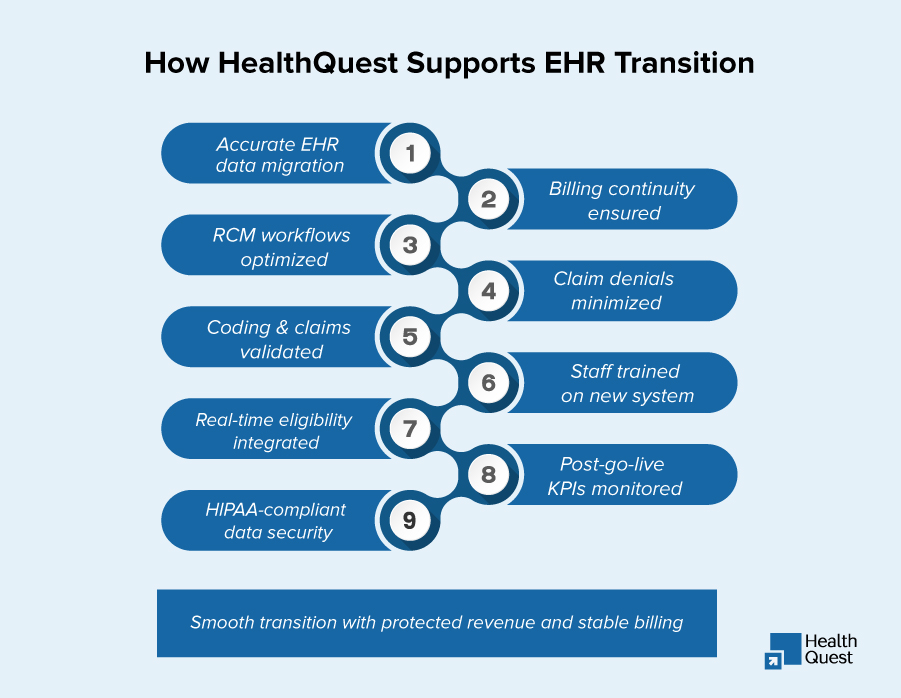
Switching EHR systems can directly impact your revenue cycle, claim accuracy, and cash flow stability. Even small migration errors can lead to claim denials, delayed reimbursements, and billing disruptions. Health Quest Billing helps healthcare providers complete a smooth EHR transition through accurate data migration, workflow validation, billing optimization, denial prevention strategies, and implementation support.
Protect your revenue cycle and maintain uninterrupted reimbursement during your EHR transition with expert billing-focused migration support.